
Point of sale · Kenya
Sell faster. Know your numbers by closing time.
Lightswitch POS rings up sales, tracks every item on the shelf, keeps your credit customers honest and turns the day’s trading into a profit and loss you can trust. It runs in the browser on the laptop, tablet or touch screen you already have.
- Cash, M-Pesa, card and Paybill in one sale
- 16% VAT worked out on every line
- Barcode scanning and label printing
- P&L and balance sheet built in
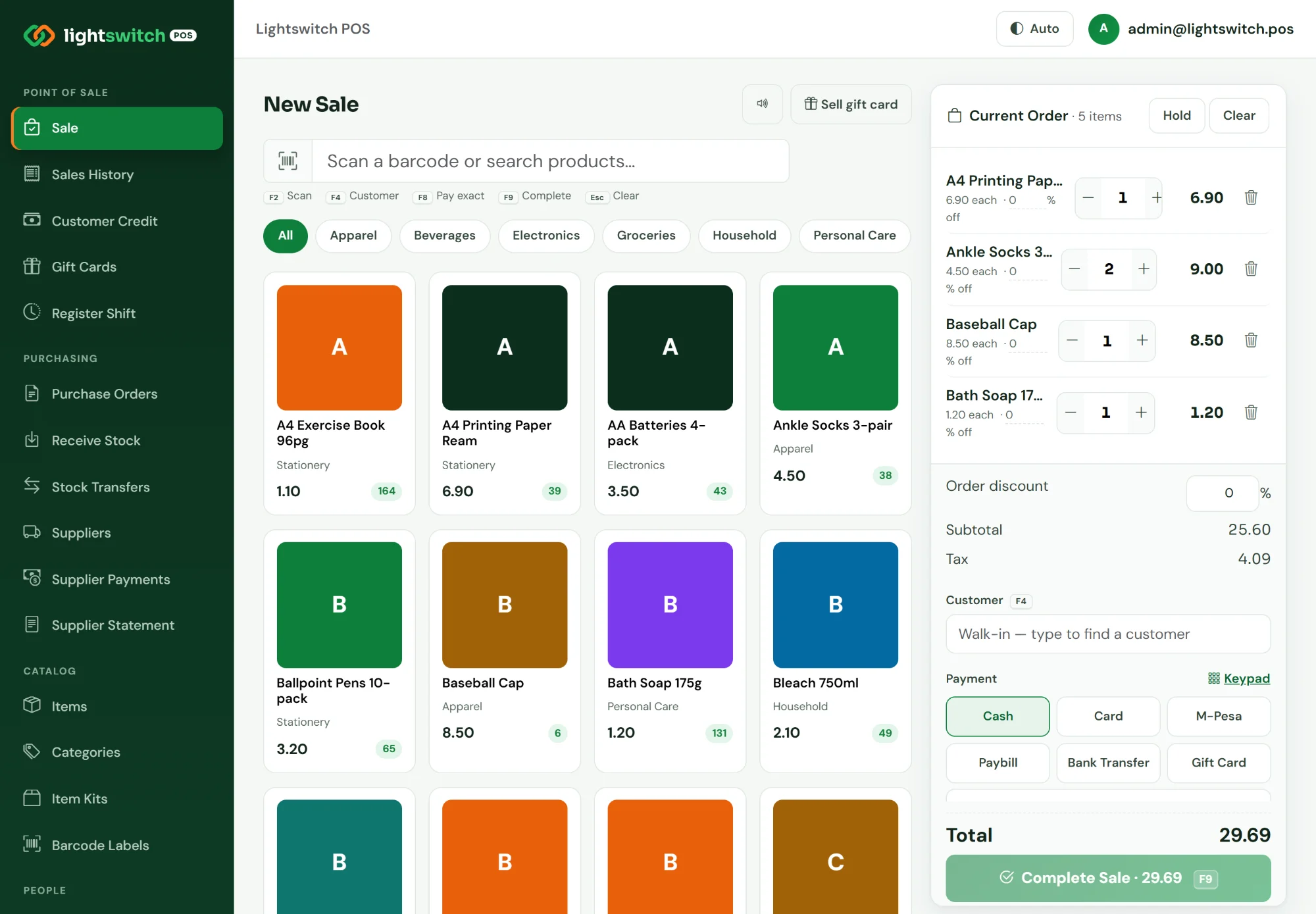
Split one bill across cash and M-Pesa
F9 Complete sale from the keyboard
Why shops switch
Sound familiar?
The cash never matches the till
Nobody knows whether the shortfall was a wrong change, a missed sale or something worse.
Stock runs out before anyone notices
Your best seller is gone and the reorder only happens when a customer asks for it.
Credit lives in an exercise book
Regulars buy on account, the book gets lost, and the balance becomes an argument.
Month-end is a guessing game
You are busy every day, yet you cannot say whether the shop actually made money last month.
M-Pesa, cash and card in three places
Customers pay half and half, and reconciling the phone, the drawer and the card slips takes an evening.
Everyone can do everything
Any cashier can delete a sale or change a price, and nothing shows who did it.
Lightswitch POS records every sale, payment and stock movement as it happens, so the answers are already there when you need them.
How it works
From empty shelves to closing report in four steps
1
Set up your catalogue
- Items with cost, price, VAT class and reorder level
- Categories, bundles (item kits) and price tiers
- Print barcode labels for anything without one
2
Open the register
- Start a shift with an opening cash float
- Each cashier signs in with their own role
- Works on a laptop, tablet or touch-screen till
3
Sell
- Scan, search or tap products into the order
- Take cash, M-Pesa, card or Paybill, or split them
- Put it on account, redeem a gift card or loyalty points
4
Close and review
- Count the drawer; the X/Z report shows any variance
- Daily sales, payments by method and low stock
- P&L, balance sheet, cashbook and ledger
Features
One system from the shelf to the books
Every screenshot below is the real product, running a demo shop’s 60 days of trading. Click one to see it full size.
Register
A checkout your cashiers learn in one shift
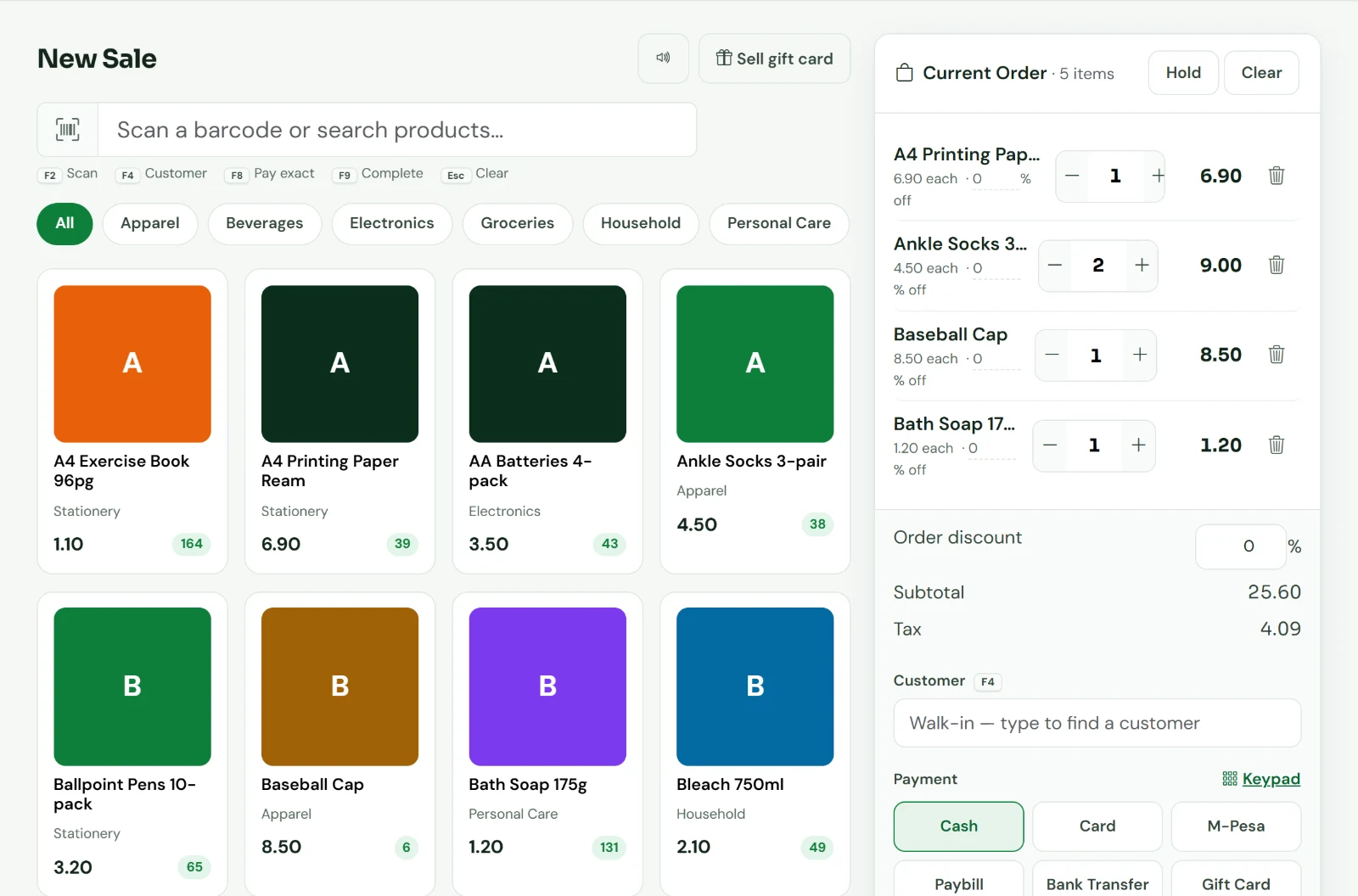
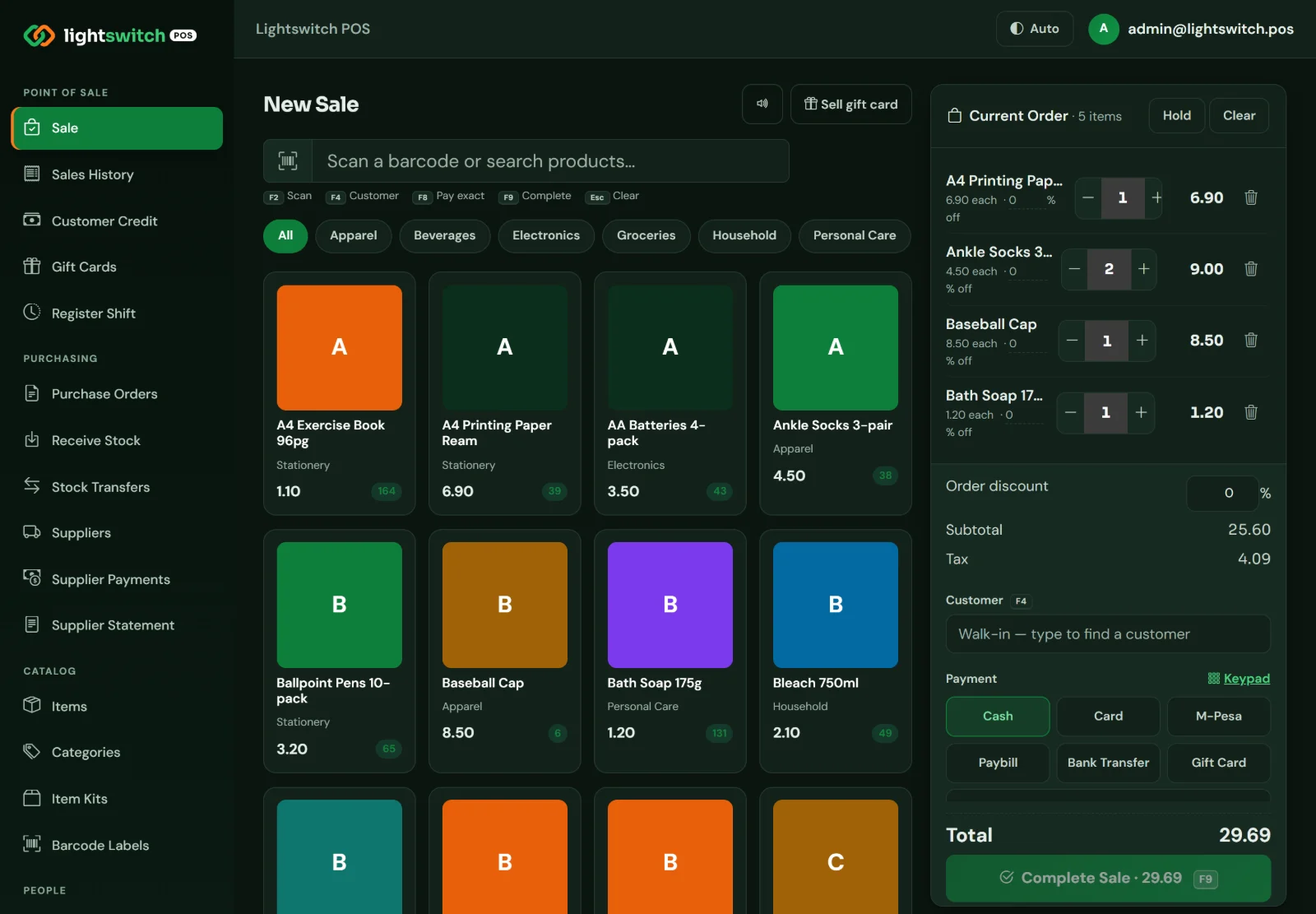
Tap products from a grid filtered by category, or scan the barcode. The order builds on the right with VAT, discounts and the total always in view.
- Split a bill across cash, M-Pesa, card, Paybill, bank transfer and gift card
- Per-line and whole-order discounts
- Hold a sale and resume it when the customer comes back
- Keyboard shortcuts: F2 scan, F4 customer, F8 pay exact, F9 complete
- On-screen keypad for touch tills
Reports
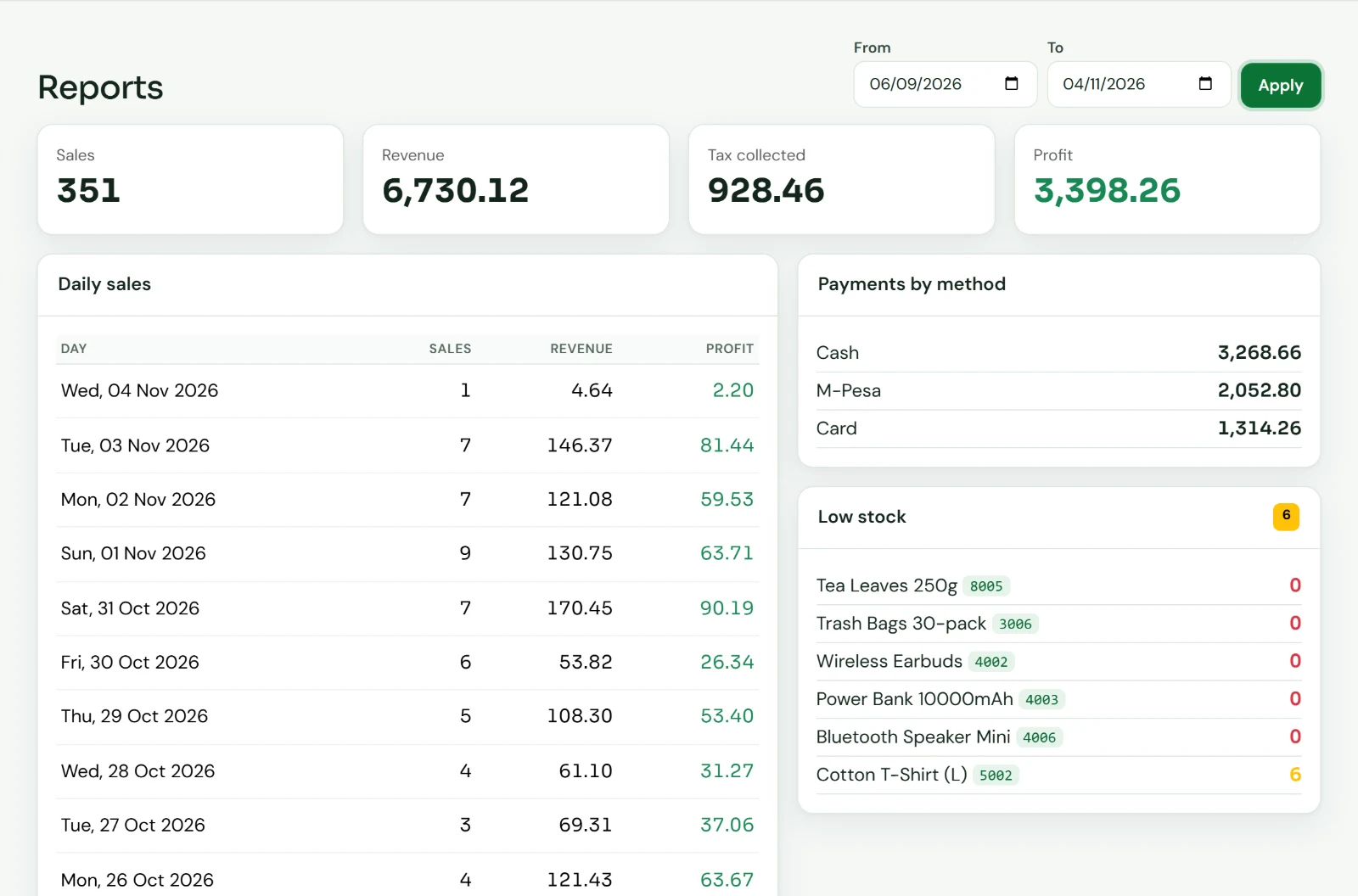
See today's trading before you lock up
Pick any date range and get sales, revenue, VAT collected and profit at the top, with the day-by-day detail underneath.
- Daily sales with revenue and profit per day
- Payments by method, so the M-Pesa statement and the drawer reconcile
- Low-stock list with what is already at zero
Stock and purchasing
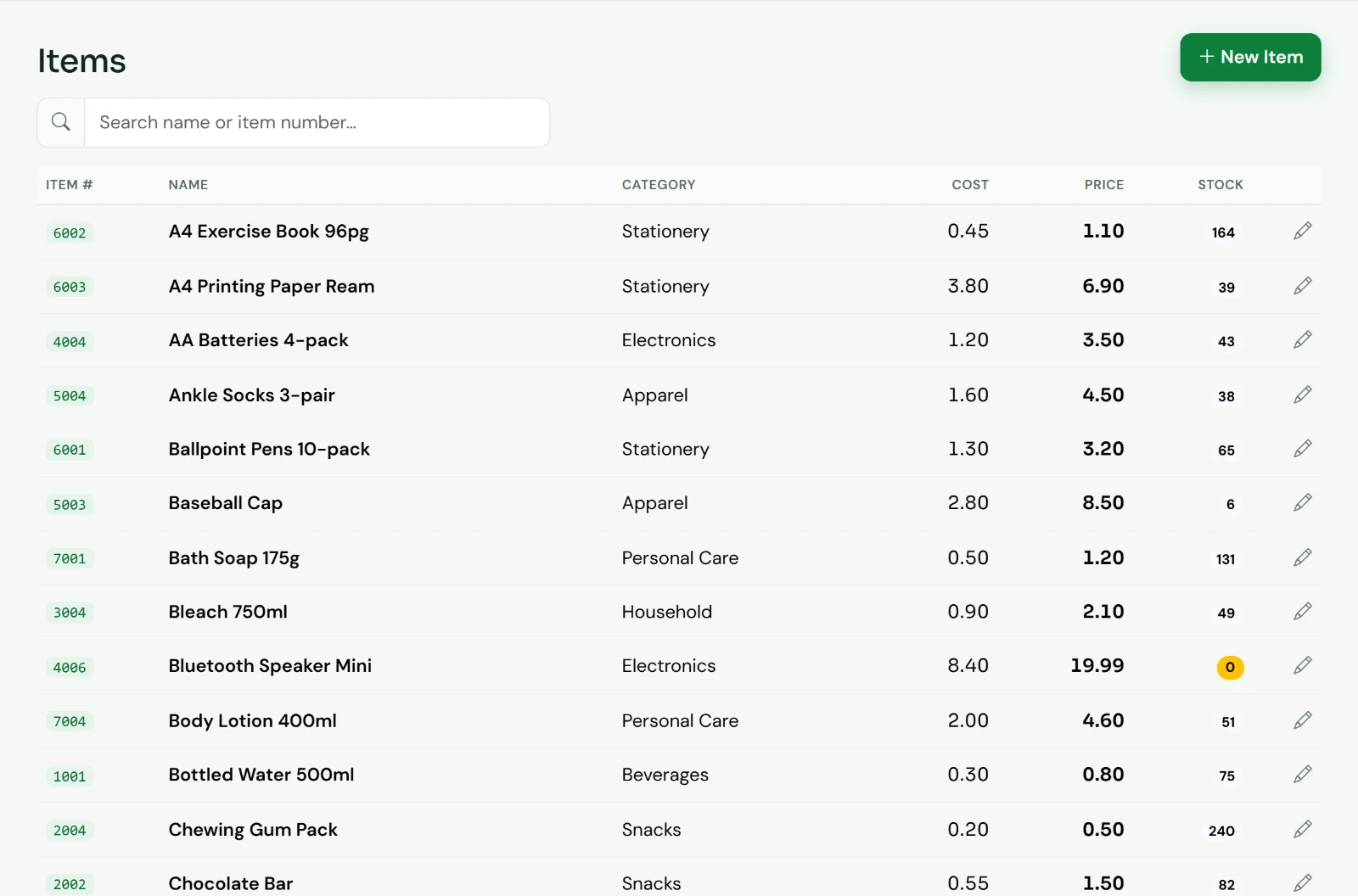
Know what is on the shelf without walking to it
Every sale takes stock off and every delivery puts it back, at the new cost. Items at or below their reorder level are flagged.
- Receive stock from suppliers, paid now or on account
- Purchase orders with manager approval
- Transfer stock between branches
- Supplier payments, statements and an A/P aging
- Printable barcode label sheets
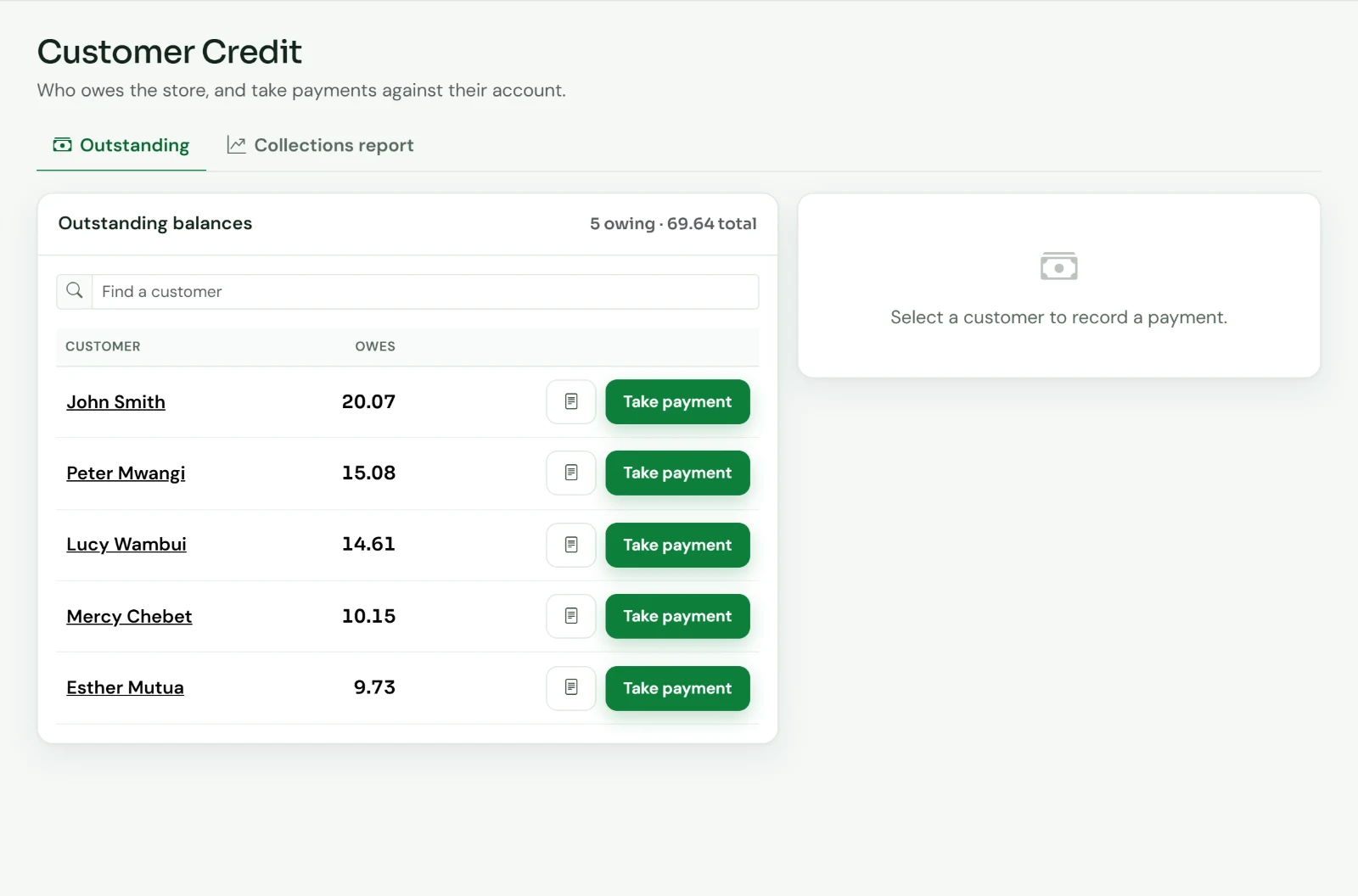
Customer credit
Sell on account and actually get paid
When a registered customer pays less than the total, the balance goes on their account. You see who owes what, take payments against it and print a statement.
- Walk-in customers can't run up credit
- Collections report by date, time and payment mode
- Export to CSV or Excel, or print
- Loyalty points and gift cards as tenders
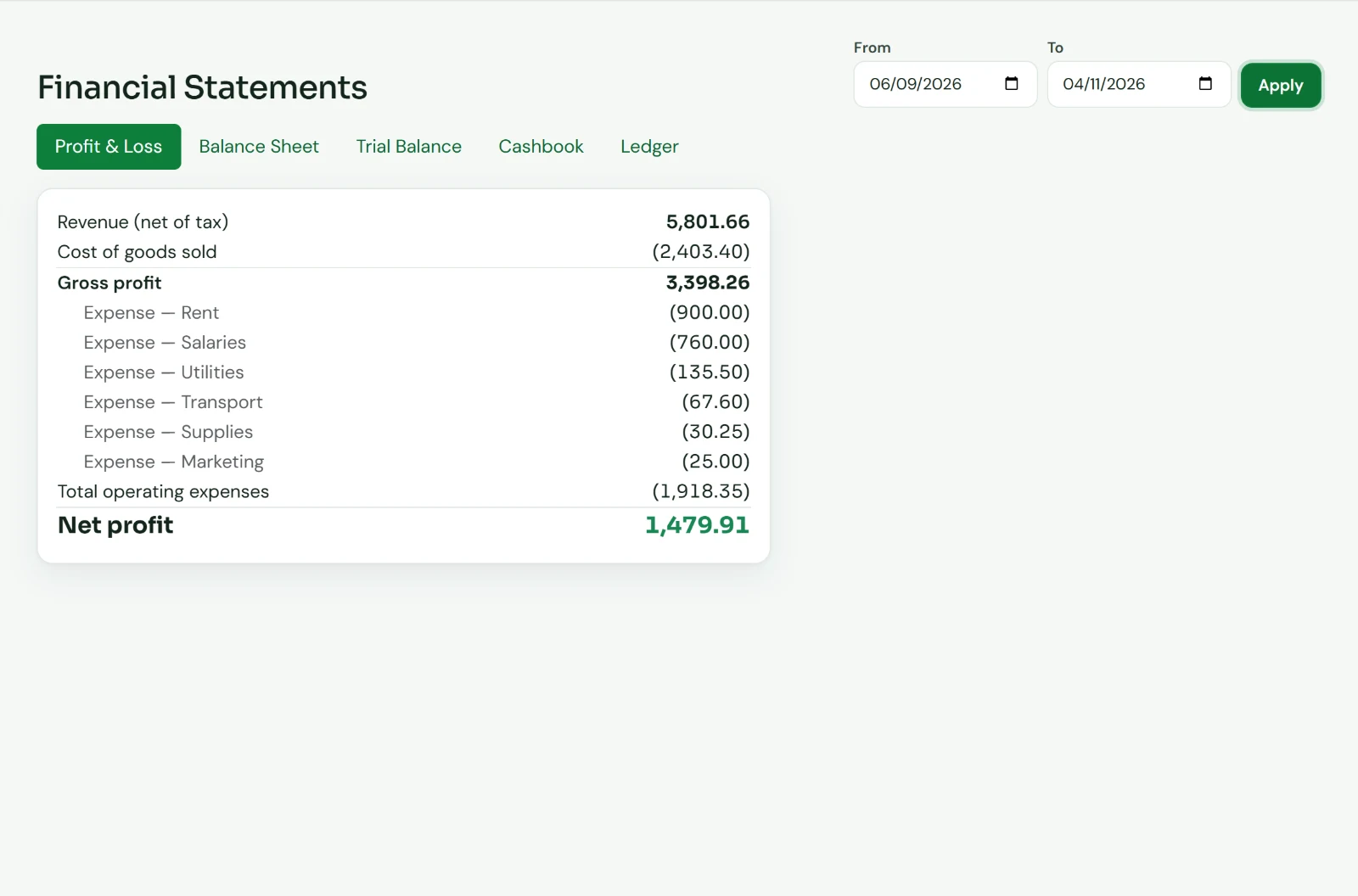
Financial statements
Books that balance, without a second system
Sales, expenses, deliveries and supplier payments post to a double-entry ledger automatically. Your accountant gets real statements, not a spreadsheet to rebuild.
- Profit and loss, balance sheet and trial balance
- Cashbook and full ledger
- Separate accounts for cash, M-Pesa, card and bank
- Record and categorise expenses: rent, salaries, utilities
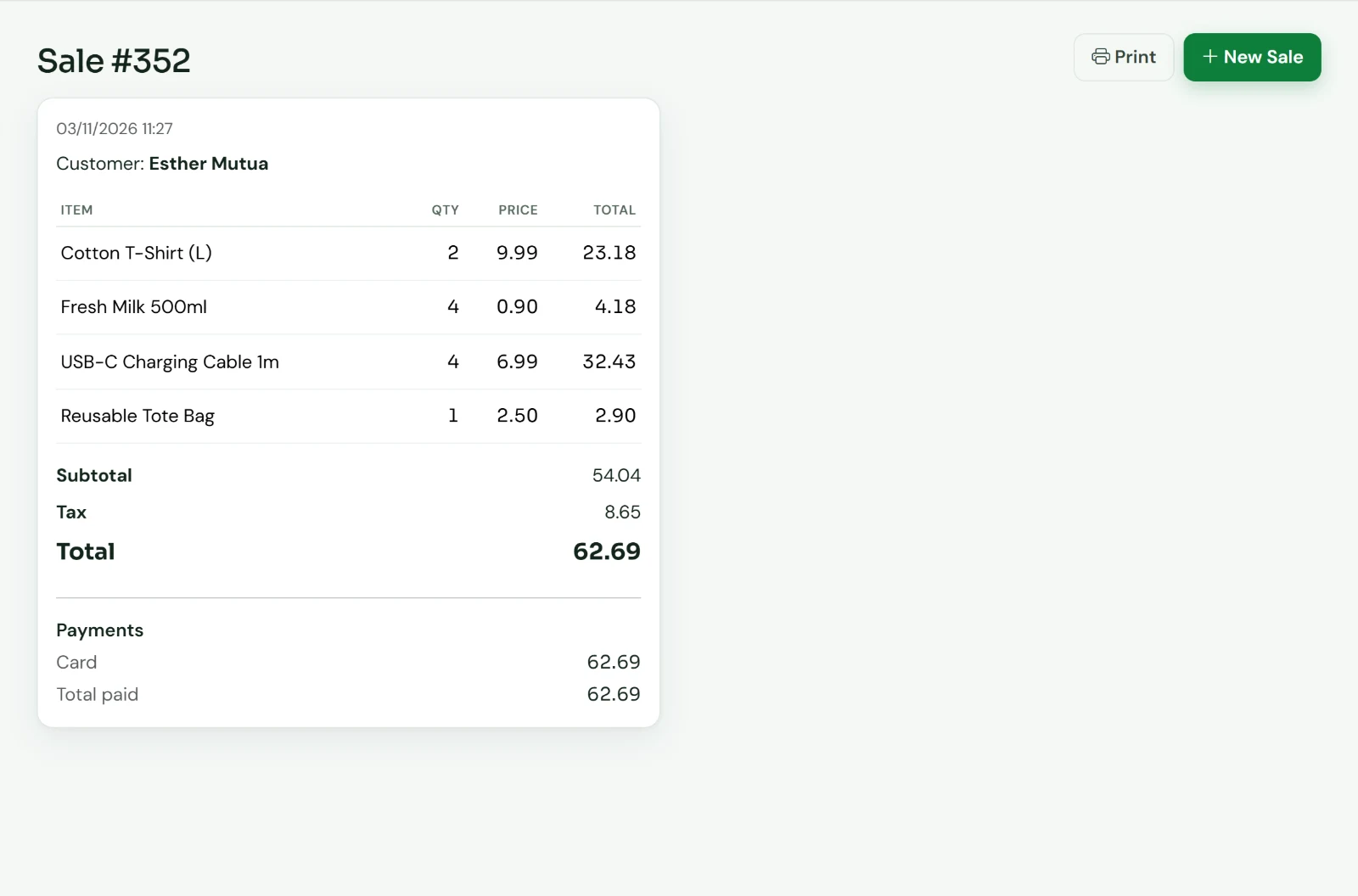
Receipts, history and shifts
Every shilling accounted for
Each sale keeps its items, VAT, customer and how it was paid. Mistakes are voided, never deleted, and the stock goes back on the shelf.
- Itemised, printable receipts
- Sales history with void and automatic restock
- Open and close register shifts with an X/Z report and cash variance
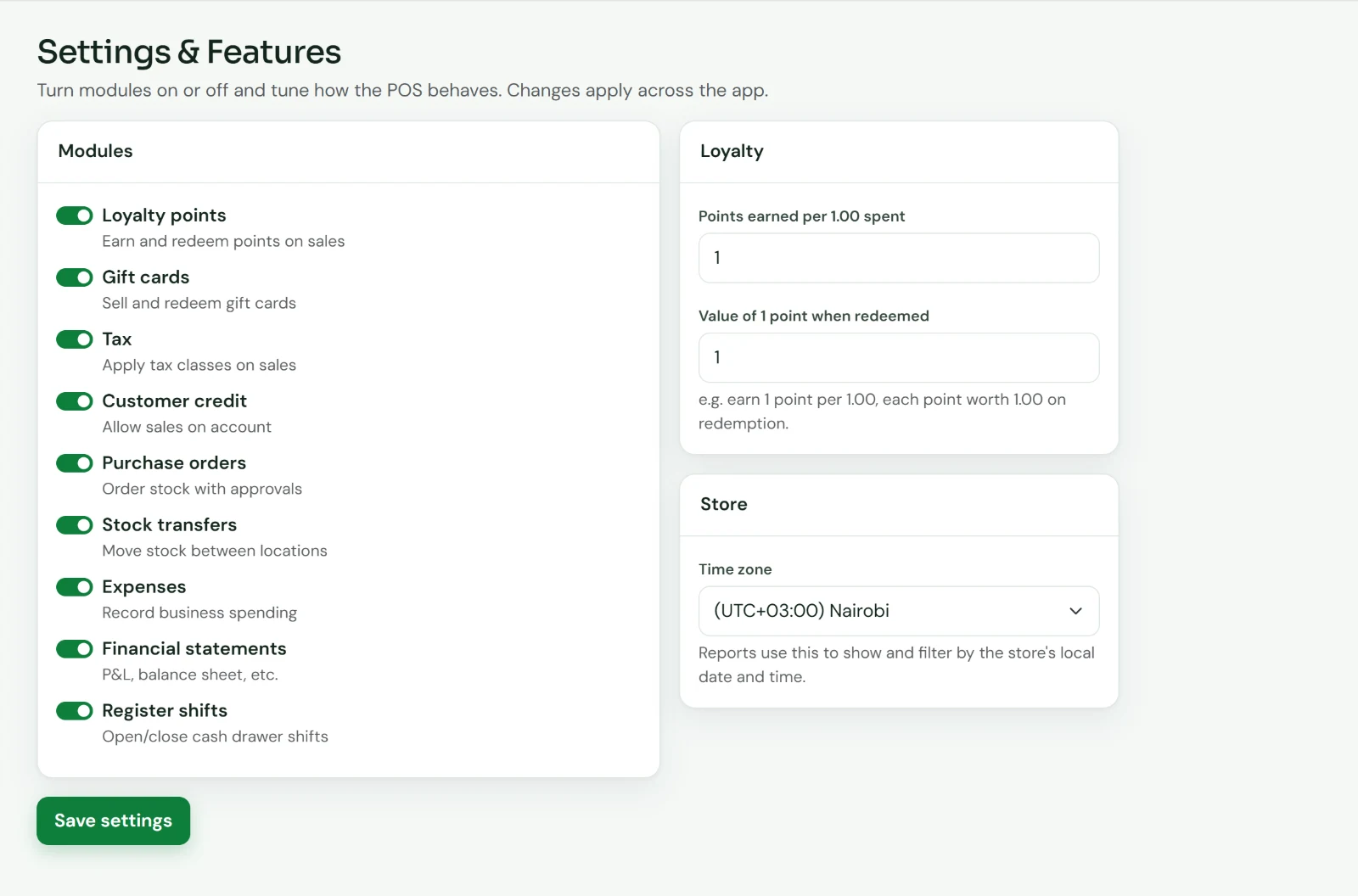
Settings
Switch on only what your shop needs
A small kiosk doesn't need purchase orders. A supermarket does. Turn modules on or off and the menus and screens follow.
- Loyalty, gift cards, tax, customer credit, purchase orders, stock transfers, expenses, financial statements and shifts
- Set how many points a sale earns and what a point is worth
- Reports in your shop's time zone
- Light and dark mode for long shifts
7
ways to pay, combinable in one sale
5
financial statements, from P&L to ledger
3
staff roles: admin, manager, cashier
9
modules you can switch on or off
0
software to install on the till
Easy on the eyes
Built for twelve-hour days
Large touch targets, clear numbers and a dark mode that follows the device setting, so the evening shift is as comfortable as the morning one.
Who it’s for
Made for the shops that keep Kenya running
MM
Mini-marts and supermarkets
Fast scanning at busy hours, hundreds of items, VAT on every line and a clear daily close.
HW
Hardware and electrical
Contractors on account, bulk price tiers, and deliveries received straight into stock.
BT
Boutiques and apparel
Gift cards, loyalty points and bundles that bring regulars back.
EL
Electronics and phone shops
Higher-value stock you need to count, with every movement on record.
ST
Stationery and bookshops
Back-to-school rushes, school accounts on credit and labels for every shelf.
MB
Retailers with more than one branch
Several locations and registers, stock transfers between them and one set of books.
Control
Your shop, your rules, a clear record
Roles for every member of staff
Cashiers sell. Managers approve purchase orders. Only admins change the setup.
Voided, never deleted
A cancelled sale stays on record as void, with the stock and the credit reversed.
Books that always balance
Every transaction posts both sides, so the trial balance and balance sheet tie out.
A trail of who did what
Sign-ins, voids and staff role changes are logged. Repeated wrong passwords lock the account.
Compare
Why not the exercise book?
| What you get | Lightswitch POS | Book and calculator | Basic cash register |
|---|---|---|---|
| Split one sale across cash, M-Pesa and card | Yes | No | Partly |
| Stock reduced on every sale | Yes | No | No |
| Low-stock list | Yes | No | No |
| Customer credit with statements | Yes | By hand | No |
| Shift close with cash variance | Yes | By hand | Partly |
| P&L and balance sheet | Yes | No | No |
| Separate staff roles | Yes | No | Partly |
| Support in Nairobi | Yes | No | Varies |
A general comparison of approaches, not a review of any named product.
FAQ
Questions we are asked
What hardware do I need?
Any computer or tablet with a modern browser: Chrome, Edge, Safari or Firefox. A USB or Bluetooth barcode scanner works out of the box because it types like a keyboard. Receipts and barcode labels print from the browser to your printer.
Does it work without internet?
No. Lightswitch POS runs online so every till, branch and report sees the same figures straight away. A basic mobile data bundle is enough for a counter. If your connection is unreliable, tell us during the demo and we'll talk through the options.
Does it connect to M-Pesa directly?
Not yet. Today M-Pesa and Paybill are recorded as payment methods on the sale, and they show separately in the payments report and in their own account in the books, so reconciling against your M-Pesa statement is quick. Direct M-Pesa prompts are something we can discuss for your shop.
Is it integrated with KRA eTIMS?
Not at the moment. Lightswitch POS calculates VAT on every line and reports the tax collected for any period. Ask us about eTIMS during your demo.
Can I use it in more than one shop?
Yes. Set up several locations, each with its own registers, and move stock between them with transfers. Sales, credit and the financial statements come together in one place.
How do I get my products in?
Add items with their cost, price, VAT class and barcode. During onboarding we help you load your catalogue, and you can print barcode labels for anything that doesn't have one.
Can my accountant use the reports?
Yes. The profit and loss, balance sheet, trial balance, cashbook and ledger come from a double-entry record of every sale, purchase, payment and expense. Reports can be printed, and the collections report exports to CSV and Excel.
Where is my data kept, and who owns it?
Your data is yours. Each shop has its own database on a secured server, and we can export your records whenever you ask.
Can I try it first?
Yes. Book a demo and we'll walk through it with your own products and the way your shop works. There's no commitment.
Book a demo
See your own shop in Lightswitch POS
A 30-minute walk-through by Zoom, by phone or at your shop. Bring your busiest-day questions.
No commitment. We only use your details to arrange the demo.